


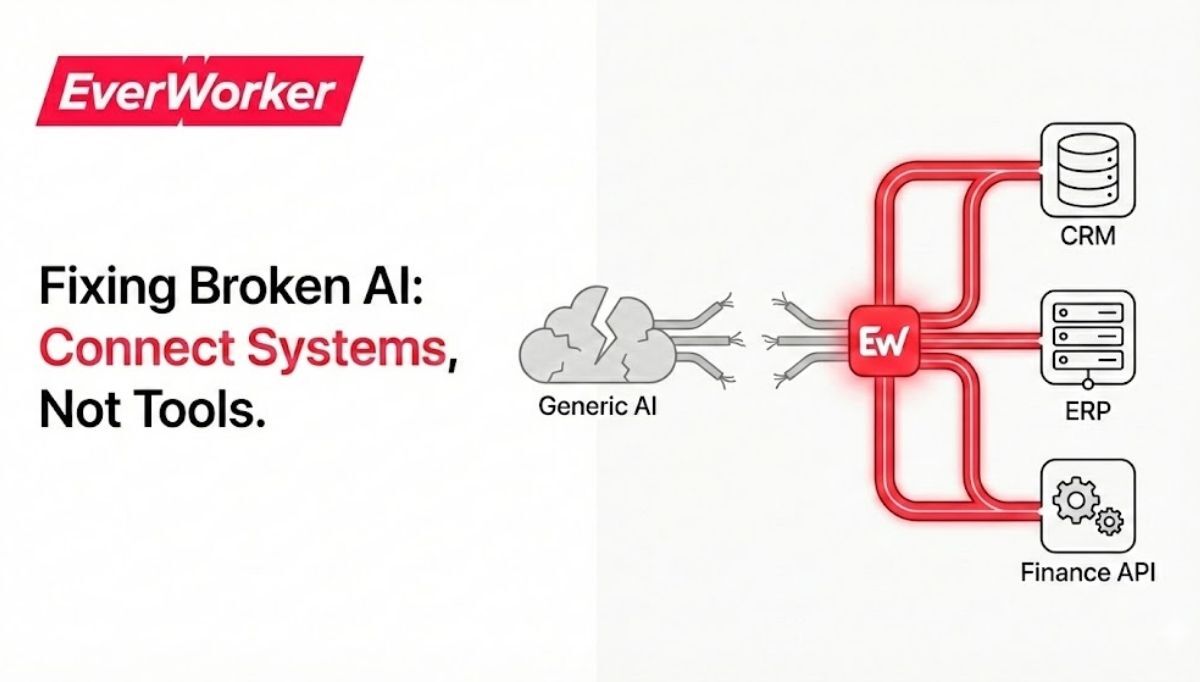
Generic AI automation tools often fail business leaders because they can’t adapt to company-specific processes, lack robust data integration, and create governance risks. The fastest path out is to shift from one-size-fits-all apps to an AI workforce approach that automates end-to-end processes, learns from your data, and plugs into your existing stack.
Boards don’t reward experiments—they reward outcomes. If you’ve tried “AI in a box” and saw demos that didn’t translate into production value, you’re not alone. Gartner warns that poor data readiness will cause many AI initiatives to stall, while McKinsey highlights pilots that don’t scale beyond proofs of concept. This guide explains why problems with generic AI automation tools persist, how to fix them with an AI workforce mindset, and a 90-day plan any line-of-business leader can run. Along the way, we’ll show where tailored AI workers outperform point tools and how to measure real ROI.
We’ll cover root causes like integration gaps, brittle automations, and change management. Then we’ll map a practical path to impact using semantic search, knowledge management, and process orchestration—without waiting on overburdened IT. If you’re evaluating options right now, you’ll also find links to strategy resources and examples from teams who turned AI from noisy pilots into durable advantages.
The Hidden Cost of Generic AI Tools
Generic AI tools promise quick wins, but they underperform when they can’t mirror your actual business logic, access live systems, or manage end-to-end workflows. The hidden costs show up as rework, shadow processes, and delayed decisions—eroding trust and masking true ROI.
For composite line-of-business leaders, the pattern looks familiar: pilots work in isolation, but production fails under real data, real edge cases, and real scale. Gartner’s 2025 guidance on AI-ready data warns that organizations abandon a large share of AI projects when the data foundation isn’t prepared. And when AI sits outside core systems, leaders face manual handoffs and “swivel chair” work that undermines adoption. As a result, teams quietly revert to old processes, and automation becomes a parallel workflow rather than the way work gets done.
The cost isn’t only operational. When automation outputs can’t be audited, or when decisions lack traceability, risk and compliance teams slow or block deployment. Productivity gains evaporate in exception handling. Finance sees rising total cost of ownership (TCO) from licenses, integration efforts, and maintenance—without the savings that the business case promised.
Why Generic AI Automation Fails at Scale
Scale breaks one-size-fits-all AI because complexity lives in your business rules, data, and systems. Without deep integration, contextual memory, and governance, automations become brittle, expensive to maintain, and easy to ignore.
Across industries, pilots stumble for three reasons. First, tool-led automations rely on rigid workflows that can’t handle variability. Second, disconnected data limits AI’s context and accuracy. Third, governance gaps raise cost and risk. McKinsey’s 2025 analysis notes that pilots often fail to scale due to poor change management and unclear ownership, even when the technology works.
Integration issues and data readiness in AI projects
Most generic tools don’t speak your systems natively, forcing manual exports or custom scripts. Without live API access and identity-aware permissions, AI can’t execute actions, only write drafts. Gartner analysts have flagged cost and data challenges as primary AI risks; leaders feel it as slow time-to-value and mounting technical debt.
Brittle automations and exception handling at scale
Decision-tree bots break on edge cases. Real work includes exceptions, policy checks, multi-system updates, and approvals. Without orchestration and memory, agents loop or escalate. That’s why at least 30% of genAI projects are abandoned post‑POC: pilots don’t survive production complexity.
Governance, compliance, and auditability gaps
When automations lack role-based controls, audit trails, and policy enforcement, risk teams slow deployment. Leaders need visibility into “who did what, when, and why”—even when it’s an AI. Without this, adoption stalls no matter how impressive the demo.
The AI Workforce Approach That Works
Replace generic tools with AI workers that execute complete processes end to end. AI workers connect to your systems via APIs, reference your policies and knowledge, and coordinate multi-step workflows—escalating to humans for judgment calls and learning continuously from feedback.
This model solves the scale problem. Instead of stitching together point solutions, you define outcomes and guardrails; AI workers handle tasks across systems with memory and governance. For marketing leaders, that may mean research → content → SEO → publishing in one flow. For support leaders, it’s triage → troubleshooting → refunds → notifications. See how this shifts strategy in our guides to AI agents for content marketing and AI for first‑contact resolution.
What is an AI worker vs. a generic AI tool?
An AI worker is a persistent, governed agent that operates in your stack, with skills, memory, and permissions—more like a digital employee than a chatbot. A generic tool produces outputs in isolation. Workers own outcomes; tools generate artifacts.
Why end‑to‑end process automation beats point tools
Value accumulates when steps are connected: no handoffs, no context loss, fewer errors. Workflows become measurable and improvable. Our 90‑day approach below shows how to stitch discovery, decision, and delivery into one governed flow.
Data, knowledge, and continuous learning as a system
Workers use semantic retrieval to ground actions in your latest policies, products, and history, then learn from corrections. That turns feedback into compounding accuracy—something static tools can’t match.
Implement Tailored Automation in 90 Days
You can de-risk adoption and show ROI in one quarter. Start narrow, integrate deeply, and expand by process, not by tool category.
- Week 1–2: Baseline and prioritize. Audit top workflows by volume, cost, error, and customer impact. Pick one process with clear rules and system access. For planning templates, see AI strategy in 90 days.
- Week 3–4: Connect data and systems. Ensure API connections, identity/permission mapping, and policy documents are available. According to Gartner, data readiness is the #1 predictor of success.
- Week 5–6: Build and run in shadow mode. Have the AI worker draft actions while humans review. Measure precision/recall, cycle time, and exception patterns.
- Week 7–8: Move to supervised autonomy. Allow the worker to execute low‑risk steps with approval gates for higher‑risk actions. Track CSAT, handle time, and cost per transaction.
- Week 9–12: Expand and harden. Add adjacent steps, strengthen guardrails, and document governance. Share results and train teams; change management is where scale happens, as McKinsey emphasizes.
For practical content and prompt systems you can reuse, see our playbooks on AI prompts for marketing and this case study on replacing a $300K SEO vendor with AI workers.
Selecting high‑ROI, low‑risk starter use cases
Choose processes with high volume, clear rules, and measurable outputs: support triage, refunds, lead routing, or monthly reporting. These deliver fast wins while building muscle for harder automations.
Designing guardrails and KPIs leaders can trust
Define permissions (read, write, execute), approval thresholds, and audit trails. Track precision, cycle time, exception rate, and business impact (revenue influenced, cost reduced). Make dashboards visible to sponsors.
Scaling from one workflow to a portfolio
Once a worker is stable, add adjacent steps and parallel processes—marketing ops, support ops, finance ops. Standardize templates and governance so every new worker is faster to deploy.
Rethinking Automation: From Tasks to Processes
The old way automated tasks inside tools; the new way automates outcomes across systems. This perspective shift is why leaders move past fragmented bots toward orchestrated AI workers with governance and memory.
Traditional automation focused on “click savings.” But real leverage is in end‑to‑end orchestration: the sequence of understand → decide → act → verify. That’s where context, policy, and data converge. Forrester’s 2026 predictions reflect this split—suites that coordinate agents versus point automations that struggle to scale. Leaders who invest in orchestration and governance ship value faster and avoid the sprawl that inflates cost without improving outcomes.
This is also a shift in ownership. Instead of IT-led, one-off projects, business teams should lead with clear outcomes while IT ensures security and data access. That balance speeds time‑to‑value and reduces the “tool fatigue” that haunts generic AI.
Your Next Moves to De‑Risk AI Adoption
Translate ideas into action with a short, staged plan that builds confidence and momentum.
- Immediate (This Week): Run a 2‑hour process audit. Rank top five workflows by impact and difficulty. Align on one starter process with a single metric (e.g., cut cycle time 40%).
- Short Term (2–4 Weeks): Prepare data and permissions; document policies; connect APIs. Draft success criteria and exception handling rules. For templates, start with our executive AI strategy guide.
- Medium Term (30–60 Days): Pilot in shadow mode, then supervised autonomy. Publish a weekly dashboard to sponsors tracking precision, cycle time, and exceptions.
- Strategic (60–90+ Days): Scale to adjacent steps. Create a governance playbook and reusable worker templates so every new workflow is faster than the first.
- Transformational: Build an AI workforce portfolio across functions—support, marketing, finance, sales ops—so compounding gains show up in EBITDA, not only in task metrics.
The fastest path forward starts with building AI literacy across your team. When everyone from executives to frontline managers understands AI fundamentals and implementation frameworks, you create the organizational foundation for rapid adoption and sustained value.
Your Team Becomes AI‑First: EverWorker Academy offers AI Fundamentals, Advanced Concepts, Strategy, and Implementation certifications. Complete them in hours, not weeks. Your people transform from AI users to strategists to creators—building the organizational capability that turns AI from experiment to competitive advantage.
Immediate Impact, Efficient Scale: See Day 1 results through lower costs, increased revenue, and operational efficiency. Achieve ongoing value as you rapidly scale your AI workforce and drive true business transformation. Explore EverWorker Academy
How EverWorker Solves This Instantly
EverWorker replaces generic tools with governed AI workers that operate in your systems like always‑on teammates. Business users describe outcomes; EverWorker Creator—your built‑in AI engineering team—builds workers that connect to your APIs, apply your policies, and execute end‑to‑end workflows with audit trails.
Two capabilities remove the usual blockers. The Universal Connector ingests OpenAPI or GraphQL specs to auto‑generate actions, so workers can read and write to your CRM, ERP, ticketing, or finance systems without custom coding. The Knowledge Engine gives workers short‑ and long‑term memory, grounding every action in your latest procedures, product data, and compliance rules. Role‑based permissions and complete activity logs ensure governance.
Leaders deploy in days, not months. Start with one worker—say, refund resolution or monthly revenue reporting—then expand to a portfolio. Customers use EverWorker to automate support workflows end‑to‑end, from triage to refunds to notifications, and to run integrated marketing operations from keyword research through SEO content creation at 15× output. Because workers learn from feedback, accuracy and coverage improve continuously—turning AI from tool sprawl into a durable operating advantage.
What’s Next for Leaders
Three takeaways: generic AI tools fail at the seams between systems; end‑to‑end AI workers unlock ROI with context, orchestration, and governance; and a 90‑day, business‑led plan beats multi‑year bets. If you’re ready to move beyond pilots, upskill your teams and start with one high‑impact, well‑governed workflow—then scale what works.
Frequently Asked Questions
What are the main problems with generic AI automation tools?
They lack deep integration, contextual memory, and governance. That causes brittle automations, manual handoffs, and compliance concerns. The fix is an AI workforce approach that connects to your systems via APIs, uses your policies and knowledge, and automates end‑to‑end processes with auditability.
How should business leaders choose AI automation platforms?
Prioritize end‑to‑end workflow automation, API interoperability, identity‑aware permissions, organizational memory, and audit trails. Ask vendors to run in shadow mode on your data and measure precision, cycle time, and exception rates before moving to supervised autonomy.
What’s the fastest way to prove ROI?
Pick a high‑volume, rule‑based process (refunds, triage, lead routing). Connect systems, document guardrails, and run a four‑week shadow mode. Measure cycle time reduction and error rates. Then allow supervised autonomy with approvals for higher‑risk steps and publish weekly dashboards.
Where can I see examples and playbooks?
Explore our guides on AI strategy best practices, AI prompts for marketing, and AI pipeline analysis tools for sales. These show practical workflows, KPIs, and deployment tips you can adapt.




 Anton Antich
 Austin Braham
 Christopher Good